Spam posted as a Telegram channel: identify the target before banning
Distinguish channel senders, anonymous admins and linked-channel posts. Choose the right moderation target, understand sender-chat bans and avoid ineffective member commands.
A promotional reply appears under a channel's name. You reply with a member-ban command, but the channel keeps posting. Before adding stronger penalties, check what Telegram identifies as the sender. A channel identity, a person's account and the source of a forwarded post require different decisions.
The useful outcome is to stop the unwanted posting in your group while preserving legitimate channel announcements and staff replies. You do not need to discover the human behind a channel to make that decision, and the visible sender information does not necessarily reveal them.
Start with the original message
Open the offending message in the group or discussion where it appeared. A screenshot, copied name or forwarded complaint can lose the distinction you need. Note the destination group, message link where available, time and visible sender. Keep the record in your moderators' restricted workspace rather than inviting members to investigate an account publicly.
Telegram supports sending as a channel or group identity. In that case, the message identifies that chat rather than the operator's personal account. A channel logo beside a post is therefore a reason to inspect the sender, not evidence that a particular member wrote it.
Use the following questions before choosing an action.
| What you are investigating | First question | Safe next step |
|---|---|---|
| An ordinary member's message | Does the original identify that member? | Use the normal member-moderation process if a restriction is warranted. |
| A reply posted as an external channel | Is the channel the current sender, rather than a quoted source? | Check a channel-sender restriction and its reversal before applying it. |
| Your channel's discussion post | Did it appear automatically from the linked channel? | Review the channel/discussion setup before treating it as an intruder. |
| A message under the group's own name | Could this be an anonymous administrator? | Ask the owner to review staff conduct and permissions. |
| A member forwards a channel post | Who brought it into this group? | Separate that member's action from the original publisher. |
An anonymous administrator can speak under the group's identity. Do not turn a dispute with such a message into an attempt to ban the group itself. Agree with the owner on how staff acknowledge and correct their own posts. A custom staff title is not a reliable way to identify a human author.
The small technical distinction that prevents a large mistake
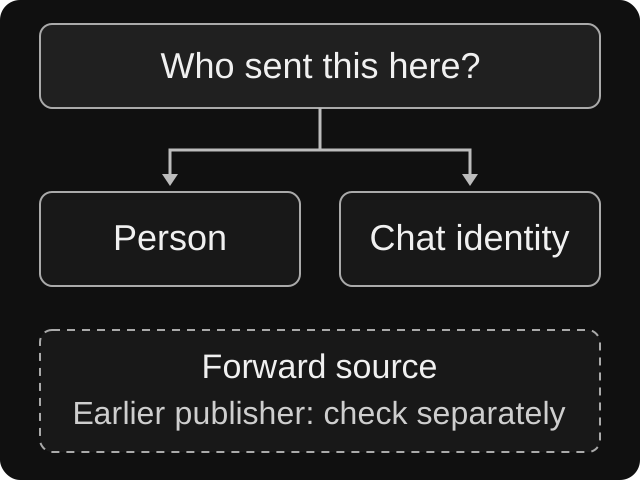
A source label does not tell you who brought the current message into this group. Start with the current sender, then inspect the origin if needed.
In the Bot API message object, sender_chat identifies a chat acting as sender. forward_origin describes an earlier source. is_automatic_forward marks a channel post delivered automatically to its discussion. For chat-sent messages, a compatibility value in from may be a fake user rather than the operator.
If you are asking bot support for help, those field names make the report precise. Ask which target type the bot resolved and which action it attempted. You do not need to publish a raw update or share unrelated message content to ask that question.
For a hypothetical example, imagine a local book club with a linked announcements channel. An unrelated channel posts an offer in the discussion. Later, a member forwards that offer to warn the moderators. Those two messages should not acquire the same target merely because both display the offer's source name. Review each original separately.
If the problem is which reposts to allow, continue with the forward-filter guide. This article concerns the identity posting the current message.
Delete a message and block a sender as separate decisions
Removing an unwanted message can contain the immediate problem. It does not establish that future posting has been restricted. Conversely, a restriction should not be assumed to remove the existing material you meant to clean up.
For channel senders, Telegram documents banChatSenderChat and unbanChatSenderChat. These use a destination chat and sender-chat ID, with suitable administrator access. The documented consequence extends to the banned channel owner's other channel identities until unbanned. Treat this as a broader restriction than hiding one channel's message, not as a way to reveal its owner or impose a Telegram-wide account ban.
Before using a tool that exposes this operation:
- Confirm the destination is the affected discussion or group, not your publishing channel.
- Confirm the target is the actual external sender. Exclude your linked channel and the group's own identity from a hurried cleanup.
- Read the action's displayed scope. Cancel if it targets a guessed person or proposes deleting more history than you intend.
- Find the corresponding sender-chat unblock path. A member-unban button may address a different kind of target.
- Record what was changed, why and who will review it. If you intend a temporary decision, arrange a review rather than assuming every interface supports an automatic expiry.
Client wording and available controls vary. If your Telegram client or moderation tool does not expose a clear channel-sender action, stop at the action you can verify, such as removing the particular unwanted message. Escalate the sender restriction to an administrator with a supported route. Repeating an unrelated command will not make the target correct.
What to expect from Defendy commands
Defendy's reviewed reply resolver recognizes a sender chat before falling back to an ordinary sender. However, its reviewed /ban and /unban execution paths use Telegram's member ban and unban methods. Recognizing the channel is not enough to establish a supported channel-ban workflow.
Do not paste a channel ID into /ban, strip a minus sign from an ID, or substitute a familiar person's username to make the command accept something. Those attempts either fail to address the incident or risk acting on the wrong target. Nor should /unban be presented as the reversal of a channel-sender ban performed by another tool.
Use the Defendy command reference for supported member and message actions. Where a human account is genuinely the target, the member-ban guide covers that decision. For a channel-sender incident, report the target type and exact command result to support rather than assuming a successful channel restriction.
This boundary comes from implementation review. It does not certify the version running in your group, and no live sender-chat ban was performed for this article.
Rehearse with four harmless sender cases
Before rolling out any broader sender rule, use a separate test group, consenting participants and disposable messages. Ask each participant to confirm which identity they used. Do not impersonate another real community or test sanctions on uninvolved members.
- Ordinary member: send a plain test message. Confirm the tool selects that member and the agreed normal-message policy applies.
- External test channel: where the account and chat permit sending as that channel, send a clearly labeled test. Confirm the interface treats it as a sender chat. If you test a restriction, verify its matching unblock route too.
- Linked channel: publish a harmless test announcement and inspect its automatic discussion entry. Confirm the intended announcement survives the proposed policy.
- Anonymous staff reply: have an authorized administrator post a harmless note under the group identity. Confirm it is escalated through your staff process rather than treated as an ordinary member.
These are proposed acceptance checks, not reported test results. Add a manually forwarded copy as a comparison if your team still confuses sender and source. A missing message alone does not identify which rule removed it; inspect the relevant settings and available moderation log.
Close the incident with the target still visible
A useful incident note says: “External channel identity restricted in this discussion; offending message removed; linked announcement and staff reply checked; review assigned.” Add the actual identifiers and outcomes only in the restricted record. If the operator behind the channel is unknown, leave that field unknown.
After an error, undo the same kind of restriction that was applied. Verify that the intended sender can post again, and correct any separate member penalty independently. Ask for a replacement post only after the rule is fixed; lifting a restriction does not recreate deleted content.
The check is complete when the unwanted posting route is controlled, legitimate senders still work and the next moderator can tell exactly which identity was affected.