Telegram CAPTCHA: verify newcomers without locking out real members
Choose a Telegram CAPTCHA flow, set sensible time and attempt limits, test join requests and in-group checks, and give legitimate members a recovery path.
A new member opens your community invitation on their phone, switches away to answer a call, and comes back to find they have been removed. The CAPTCHA behaved as configured, but the community lost a legitimate participant. Meanwhile, another invitation might admit people through a route you never tested.
Start with the newcomer’s journey: how they enter, where the challenge appears, and what ends the waiting period. Choose the puzzle afterward. CAPTCHA can add friction to unwanted joins, but completing a challenge does not establish that an account is human-operated or that its future messages will be welcome.
Choose the entry flow before choosing a challenge
Defendy offers two modes with different outcomes.
| Question | In group | Join requests |
|---|---|---|
| When does the check begin? | After the member joins | After a join request |
| Where is the challenge? | In the group, optionally in a selected topic | In a private chat with the bot |
| What does success mean? | Return to ordinary group permissions | Approval of the request |
| What does failure do? | Applies the configured kick or mute; ban blocks the account without applying a duration | Declines the request; selecting ban also blocks the account without applying a duration |
If people already join your open group directly, test In group first. If your community needs screening before admission, use Join requests and configure the corresponding entry route in Telegram. Selecting the mode in the Mini App does not convert an ordinary invitation into an approval-required invitation. Use the invite-link and approval guide to audit entry routes and replace an exposed invitation.
Try the actual links published on your website, in your channel and by community partners. Testing one route does not establish that every route behaves identically. Coordinate with other administrators, too: Defendy does not add a second in-group challenge after an approved join request. Manual approval is already an admission decision.
Telegram itself supports join requests and introduced guardian bots with Mini App screening interfaces in June 2026. That platform capability does not establish support in every moderation product. The Defendy join-request workflow described here delivers its challenge by private message.
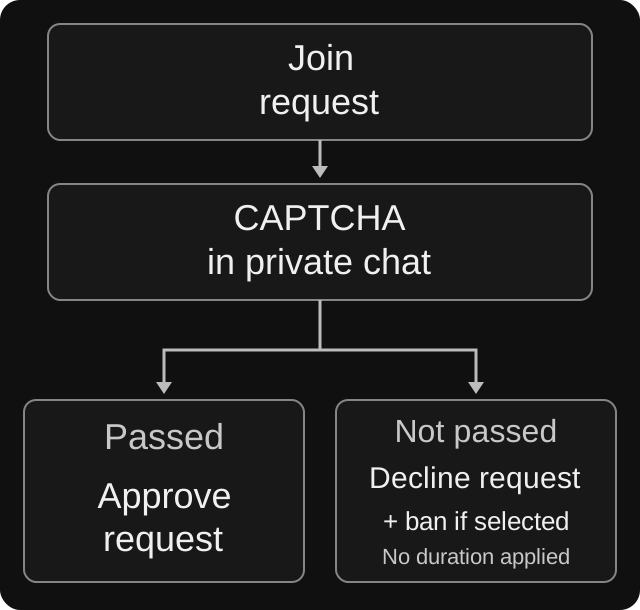
A failed join-request challenge is declined. If ban is selected, the bot also attempts to block the account; this code path does not pass a ban duration to Telegram.
Pick a challenge your members can actually use
The Mini App offers Button, Math, Emoji, Question and Random. Random selects from the types you enable; at least one must remain selected. Question uses a prepared challenge. Do not assume it includes an editor for your own admissions questionnaire.
A button is a reasonable starting point when you want a simple acknowledgement before participation. Arithmetic and other types demand more attention. Before increasing that demand, check the wording in your community’s language and the experience on a small phone screen. Can someone using their usual accessibility tools locate the instruction and complete it?
For an international group, do not assume that everyone understands the same language or recognizes the same emoji immediately. Random selection does not fix an inaccessible challenge: remove the troublesome type from the pool, then test again.
Defendy’s time choices are 30, 60, 90, 120, 180 and 300 seconds. Attempt choices are 1, 2, 3 and 5. The timer needs to cover finding and reading the message, as well as answering it. Five minutes and two attempts for a multiple-choice challenge are a sensible test configuration, not a universal recommendation or a protection guarantee. See the CAPTCHA parameter guide.
Configure it in a test group first
Open your private chat with @defendy_bot, choose Settings, select the group under My groups, and open Captcha. Make the first changes in a separate test group.
- Confirm the test group’s name. Enable CAPTCHA to reveal the remaining controls, then choose the mode that matches its invitation route.
- Select the challenge type, response time and attempt limit.
- Choose the failure action. In the group, kick removes a member but allows a later rejoin; mute prevents posting; ban prevents returning. In join-request mode, failure declines the application and selecting ban additionally attempts to block the account. In both modes, the CAPTCHA ban ignores the selected duration: the implementation passes no expiry to Telegram. Do not use it as a temporary waiting period.
- For an in-group mute, set and verify the sanction duration separately from the time allowed to answer. This branch uses the configured mute duration. Changing the action resets the duration to zero, which means no expiry for that mute; choose a finite value if you intend a temporary restriction. A duration shown for ban does not make the ban temporary.
- Wait for saving to finish. Switches and selectors save as you change them. If a request fails, reopen the section and verify the actual values. After testing, apply the chosen settings to the real group while an administrator can watch incoming members.
Set the bot’s administrator permissions in Telegram. Match them to the actions it needs; approving and declining join requests require permission to invite users. Granting every administrative right is a poor substitute for identifying the operation that failed.
For a forum group, In group mode can use the shared topic or a separate CAPTCHA topic. To assign one, turn off Use global topic, send /setcaptchatopic inside the intended topic, and confirm the destination in the panel. This does not move a join-request challenge out of private messages. The setup guide covers the sequence.
A worked example: an international photography group
Consider a hypothetical photography community with members joining from several time zones. The administrators want a light entry check, while allowing members to post portfolio links once inside. They choose an in-group button challenge, five minutes to respond and kick on failure.
One administrator tests the invitation on a phone and discovers that the challenge appears in a topic a newcomer would not think to open. Replacing the button with a harder puzzle would leave the real problem untouched. They correct the topic, then repeat the journey with an ordinary account.
The community’s invitation page now explains the check and provides a moderator contact. That matters when the next moderator may be asleep: a failed applicant can leave a useful message without repeatedly trying to join.
A welcome message can explain the rules, but seeing a welcome message does not establish that verification succeeded. Similarly, a member who passes and later advertises unrelated services needs a message-moderation rule, rather than a more difficult entry check for every photographer.
Run a rehearsal with five outcomes
For the first-join test, use someone new to the group without administrator rights. An administrator’s experience does not demonstrate ordinary member restrictions, and a returning account already known to the bot may follow a different path. Test rejoining and administrator-added members as separate scenarios.
- Correct answer: follow the published invitation and complete the challenge. Check that the member can send a normal message, or that a join request is actually approved and admission succeeds.
- Wrong answer: exhaust the selected attempts on arithmetic or another challenge with incorrect options. A simple confirmation button has no meaningful wrong-answer path; temporarily select a different type in the test group to examine that behavior.
- Timeout: leave the challenge unanswered and inspect the result. Confirm the configured action rather than merely noting that the timer expired. Declining an application and blocking an account are separate effects; if ban is selected, check both and verify re-entry after recovery.
- Interrupted onboarding: switch away from Telegram and return. Check whether the next step and the help route remain understandable.
- Recovery: ask the tester to contact a moderator after failing. A help contact visible only in a closed group’s pinned message is unavailable to someone who has not joined or has been removed.
If you use Random, test each selected challenge type. Record the entry route, settings and observed outcome. A screenshot showing that a challenge appeared does not verify its success or failure behavior.
Help someone who gets stuck
Ask which invitation they used, roughly when they tried, and what they saw. A redacted error screenshot may help. Avoid collecting unrelated private messages or identity documents for an ordinary access problem.
Determine the current state before acting: is the request pending or rejected? Has the person been removed, muted or banned? A moderator can then review the request or reverse the specific mistaken restriction. Unmute and unban are separate moderation actions; neither is a universal repair button for a pending challenge. Retest joining and ordinary posting after recovery.
If legitimate members keep failing, change one cause at a time: message location, time allowance, attempts or challenge type. Review available records if you have already enabled logging for the relevant categories. An absent record in a disabled category is not evidence that no check occurred.
Rose’s maintainers offer a useful warning about their automatic unmute setting: it can admit people who never completed verification. This describes Rose’s design, not an additional Defendy control. It illustrates a question worth asking of any CAPTCHA bot: does waiting end because someone answers, a timer expires, or a moderator intervenes?
Your launch checklist
Every published entry route has been tested. Correct answers, exhausted attempts and timeout produce the expected outcomes. Newcomers can find both the instruction and a help contact. Moderators know how to reverse a mistake. Separate rules cover messages after admission.
That gives you a verifiable onboarding process. If unwanted messages still arrive after successful checks, use the incident guide: what to do when spammers get past CAPTCHA.
Sources and verification date
Checked on October 5, 2026 against Defendy’s documentation and implementation; this is not a test of your group. External references: Telegram Bot API: join requests and permissions, Telegram’s guardian-bot announcement, and Rose’s CAPTCHA documentation. Another bot’s behavior is not evidence of a Defendy feature.