Hide Telegram group members: what stays visible?
Check when Telegram lets you hide a group member list, what administrators and readers can still see, and how to verify the setting without promising anonymity.
Telegram can hide a group's member list from ordinary members. Administrators retain visibility, and posting in the group still reveals your participation. Use the setting to reduce exposure through the member directory; do not describe the group as anonymous or promise that nobody can contact its readers.
That distinction matters when members receive unsolicited sales pitches or messages from fake support accounts. Hiding a directory can help with one discovery route. Your admission rules, public messages and members' own privacy settings still need attention.
Can your group hide its members?
Telegram's December 2022 announcement introduced the feature for groups with at least 100 members. The current client-configuration documentation also shows 100 in its example, but defines the minimum as a server-provided setting named hidden_members_group_size_min.
Use 100 as the published reference point, then check availability in your group. Telegram sets the current minimum through its server configuration, so the documentation example does not guarantee that the switch will appear.
The current API method applies to supergroups, requires administrator authority and documents an insufficient-participants error. An ordinary member cannot switch it on for everyone. If the option is unavailable, check the group type, your role, the member count and your official app version before looking for a workaround.
For a group below the required minimum, a bot or an alternative client should not be advertised as a way around Telegram's eligibility rules. Do not add fake members simply to reach a number: that undermines the admission boundary you are trying to improve.
Turn it on, then check the reader's view
Use an updated official Telegram client and an account authorized to manage the group. Find the group's native Hide Members setting, enable it, then reopen the setting to confirm it remained enabled. Menu placement and wording vary across clients.
The important part comes after the switch. Ask a consenting ordinary member to inspect the group information. Your administrator account is the wrong account for validating what regular readers can see.
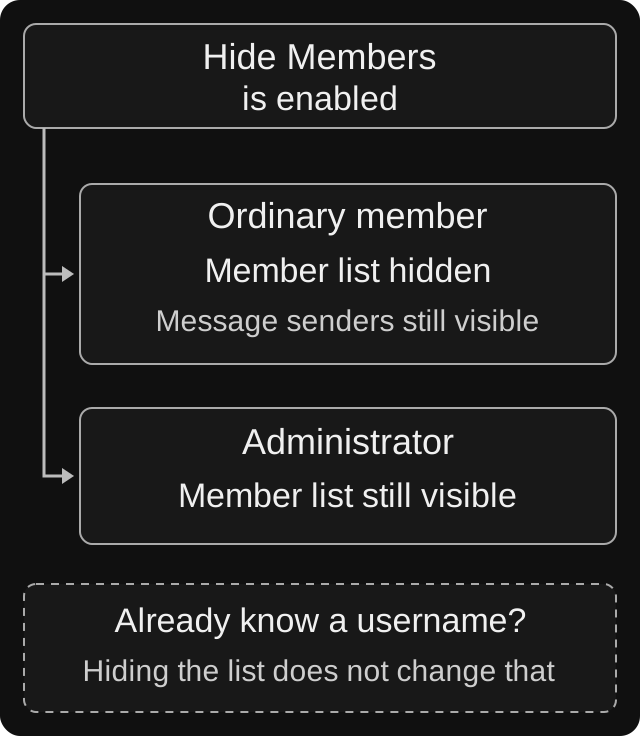
Explanatory diagram, not a Telegram screenshot. Hiding the directory changes one discovery route; it does not hide the senders of ordinary posts or erase information someone already knows.
| Person or situation | Expected boundary | Practical check |
|---|---|---|
| Ordinary member browsing the group | The full member directory is hidden | Inspect group information without administrator rights |
| Member who posts under their account | Their message still exposes their participation | Open a harmless test message and its sender profile |
| Group administrator | Member visibility remains available for administration | Confirm staff can still perform the membership checks they need |
Someone who already knows a username or has a conversation | Hiding the directory does not erase that knowledge | Review personal contact and privacy controls separately |
Telegram's supergroup model describes a member list that admins can hide, while the administrator-rights reference preserves member access for admins. Posting under a personal account is a separate source of visibility. The final row is the practical limit of changing one group setting: it cannot retract information someone already obtained.
Use harmless test accounts or volunteers, not a list of real people collected for the exercise. Check one quiet participant's directory visibility and one volunteer's ordinary message. You do not need to enumerate hidden members or send unsolicited direct messages to validate the setting.
Example: a community receiving fake support messages
Imagine a 240-member hobby community. Several readers say that someone contacted them after they joined, claiming to be a moderator and asking for a payment.
The owner enables member hiding, verifies it with a regular member and leaves a clear official support contact in the group's description. Moderators explain that unsolicited payment requests should be checked against that contact, rather than trusted because the sender uses the group's logo.
A reader who has never posted may now be less exposed through the directory. A person asking a public question still has a visible sender profile. The community should therefore avoid announcing that the scam is “fixed” solely because the member list disappeared.
For the next incident, ask the affected member to send only the relevant account details and messages privately to the moderation team. Check the report before restricting an account in the group. A matching display name or profile picture alone is weak evidence of identity.
Three other privacy controls people often confuse with this one
Phone-number and profile visibility
The group's member-list switch is separate from an individual's phone-number settings. Telegram's phone-number FAQ explains that users can participate without displaying their number and can adjust its visibility under Privacy and Security. People who already know and saved the number remain an important exception.
Ask members to review their own phone-number and profile-photo visibility, including exceptions. A public username also provides a discovery route outside the group. Do not ask people to send you their phone numbers to “verify” that these settings work.
Anonymous administrators
Telegram's anonymous-administrator feature concerns an administrator's identity in the group and the name used for their messages. It does not turn ordinary members into anonymous posters. Granting someone admin powers just to hide them creates a separate and unnecessary permissions risk.
Channels and discussion groups
A channel subscription and participation in its linked discussion group are different contexts. Telegram explains that channel comments also appear in the discussion group. Audit the group where people comment rather than assuming the channel's audience model protects their comments.
Likewise, hiding the member directory does not make individual topics private. For a staff-only conversation, review Telegram topic permissions and choose an appropriate separate audience.
If hiding is missing or will not switch off
Start with the account and the group, not a reinstall: are you managing the intended group, using the intended administrator account and looking at its current settings? Reopen the screen after a change and compare with another updated official client if available.
There is a real historical edge case behind some search results. An iOS report about disabling member hiding after the group fell below 100 members is marked Fixed in 12.7.0. It is a reason to check versions, not evidence that current groups are permanently stuck. Do not recruit people or recreate the group as your first troubleshooting step.
If the problem persists, record the client and version, your role, approximate member count, intended change and what happened after reopening the setting. Redact unrelated member details from screenshots. Those facts are more useful for a support report than a full group export.
What still needs protection
Hiding members cannot promise protection from all scraping, copying or unwanted messages. Existing posts, known usernames and information shared elsewhere may still identify people. It also does not establish what an installed bot receives or stores; that needs a separate bot-access review.
For unwanted direct messages, the recipient can use Telegram's blocking and reporting controls. Telegram's Spam FAQ explains that a spam report sends the reported messages for moderation review. Group administrators should provide a clear reporting route without requiring someone to publish a private conversation in the group.
The useful promise is narrow: you have reduced ordinary access to the member directory and checked that behavior. Keep the remaining privacy advice equally concrete.
If you cannot find your own tag-editing option with members hidden, check the member-tags troubleshooting steps before exposing the full directory just to change a label.
Sources and scope
Reviewed on 6 October 2026 using Telegram's public documentation and issue tracker. The live configuration of a particular account and the client UI were not tested. The example and checks are proposed procedures, not evidence of a guaranteed reduction in spam or a Defendy member-hiding feature.