Telegram Recent Actions: investigate a moderation incident
Use Telegram's native 48-hour admin log to investigate deletions and changes. Compare it with bot replies and Defendy logs without promising message recovery.
When a Telegram group message disappears or a member is unexpectedly restricted, start with the record that could explain that action. Recent Actions is Telegram's native administrator log. A bot's reply and a separate moderation-log chat provide different evidence; they should not be treated as interchangeable copies.
Telegram's group guide describes an administrator-only view covering the previous 48 hours, including deleted messages and earlier versions of edited messages in groups. Inspect a reported incident promptly. This is an investigation window, not a promise that every missing message can be recovered.
Which record can answer your question?
The native admin-log reference covers supergroups and channels. It supports action-type and administrator filters, plus a text query. The event structure includes a date, acting user ID and action. These are useful starting points for attribution, but the exact event and its context matter more than a familiar name on the screen.
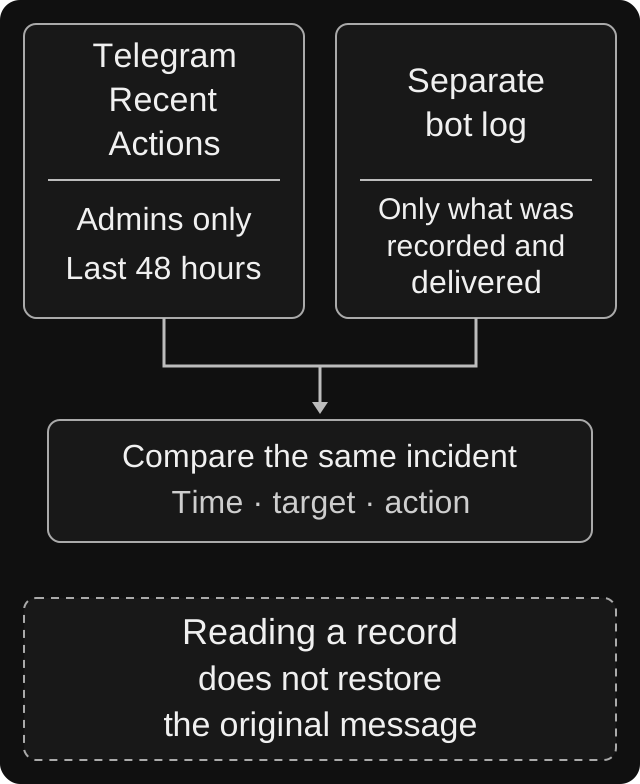
Explanatory diagram, not a Telegram screenshot. These are separate sources with different limits. A log entry or incident report can support an investigation; viewing or writing one does not restore a deleted original.
| Record | Useful for | Do not assume |
|---|---|---|
| Telegram Recent Actions | Inspecting the actor, time and action in an available native event | A complete permanent history or the human intention behind a bot action |
| A bot's command reply | Reading what the bot reported about a particular request | That the notice explains every related deletion or later permission change |
| A separate bot-log destination | Inspecting the incident details the service actually recorded and delivered | That logging covered every category or the period before it was configured |
| The original group message | Understanding the surviving conversation and surrounding replies | That an unavailable link identifies who removed the message |
For example, a command notice may mention a warning while the incident under review concerns a deletion. Similar timestamps are a lead, not enough to equate the two records. Compare the target, content and action before drawing a conclusion.
Open the native log with the right account
Telegram's group guide places Recent Actions in the administrators area. Open the intended group with an administrator account and locate the native section in your current official client. Exact menu placement varies across clients.
The retrieval method requires administrator access and is available to user accounts, not bot accounts. Making a bot an administrator therefore does not establish that it can retrieve this log. Do not grant a member broad admin rights merely so they can investigate their own complaint; a trusted moderator can review it and share the relevant outcome.
If the section is missing or does not open, check your account, current role, group type and client version. A bot's custom moderator role is a separate matter from native Telegram administrator access. See the administrator-permissions guide before changing permissions to troubleshoot.
A focused inspection procedure
- Define the incident. Write down the group, approximate time with timezone, affected message or member, and observed change. “The bot broke the chat” is too broad to investigate.
- Inspect the relevant time promptly. Separate the time the message was sent from the time someone noticed it missing. Ask for an approximate deletion time if known.
- Start without narrow filters. Clear an old text query and administrator selection. Review nearby events, then narrow to deletions, edits, restrictions or settings changes as appropriate.
- Match the exact target. Read the affected content or member details and distinguish the message author from the account performing the action. A reply can contain another person's name.
- Compare independent records. Check the bot response and available bot-log entry, if relevant. Record what agrees, what differs and what is absent.
- Check the current state. The incident explains a past change; a later action may have reversed it. Verify current restrictions or settings before attempting a correction.
Keep screenshots and relevant details in a private moderator workspace. Retain enough context to make the event understandable, while excluding unrelated conversations. An accusation posted publicly before checking the evidence can become a second moderation incident.
Example: a support question disappears after a warning
Consider a hypothetical group where a member posts a link at 14:10 UTC. A warning notice appears, and the member later says their question was deleted. Two moderators and a bot were active around that time.
The reviewer first records the exact question and time, then inspects nearby native events without an actor filter. If an event identifies the bot as the actor, that supports attribution of the recorded action to the bot account. It does not, by itself, establish which person requested the action or which filter caused it.
Next, the reviewer compares the warning notice and the bot's available incident record. They check whether the entries refer to the same member, message and action. If a filter reason is present, it can inform the diagnosis. If it is absent, the conclusion should remain narrower: the native record identifies an action, while its cause is not yet established.
Only then should the team consider correcting a restriction or adjusting a rule. Turning off all filtering because one message disappeared skips both attribution and the current-state check. For a genuine false positive, use the controlled troubleshooting procedure to check a match and a non-match before changing the rule further.
How Defendy's log fits alongside Recent Actions
Defendy's logging settings include a destination chat, an optional topic and event-category controls. A category can also have its own forum-topic destination. Its routing checks whether logging and the relevant category are enabled and whether a valid destination is configured.
That makes the destination and category part of the investigation. Before concluding that a record is missing, check the main destination and any category-specific topic. If logging was disabled, do not infer that no action occurred from an empty log chat.
These settings do not establish a complete transcript, a fixed retention period or an import of Telegram's native history. Treat a delivered record as evidence of what it actually contains. For a test, use an agreed harmless event and consenting participants; do not punish a real member just to see whether a log arrives.
Missing entries, display problems and message recovery
An empty result is inconclusive until you check the time window, filters, account and exact chat. Also establish what kind of message the person expected to see. Telegram's July 2026 release introduced bot interactions visible only to the intended user and bot. Another member not seeing such a reply does not establish a deletion. This does not claim that Defendy uses that feature.
Client bugs can also affect interpretation. An iOS attribution report and a Desktop log-filter crash are both marked fixed; the latter lists version 6.3.1. They justify checking app versions and another official client when a display looks inconsistent. They do not establish a current universal fault or invalidate every native event.
Finally, viewing deleted content is separate from restoring the original message. The log-retrieval method is not a documented restoration operation. Do not promise recovery of the original ID, timestamp, replies, media or full conversation. Republishing an approved copy is a new publication, and may expose content that someone deliberately removed.
A useful report when the cause is still unclear
Send the responsible support team a minimal private report:
- The relevant group and approximate incident time, with timezone
- The expected behavior and what actually happened
- Client name, version and the reviewer's role
- The exact action and target shown by the native event, if available
- A relevant bot reply or log entry, with unrelated personal data removed
- Filters and destinations already checked, and whether the problem remains
Leave unavailable evidence explicitly unavailable. A clear “no matching event found in the checked window” is more useful than assigning blame from an empty screen. Once resolved, record the correction and its current result so the next moderator does not repeat the same action.
Sources and scope
Reviewed on 6 October 2026 against Telegram's public documentation and fixed issue reports, plus Defendy's logging configuration and routing implementation. No live group incident or client interface was tested. The procedure is an investigation checklist; it is not a guarantee of complete collection, indefinite retention or restoration.